Skip to content
Friday, June 19, 2026
MALIKA KAROUM NEW FUTURE

MALIKA KAROUM NEW FUTURE

– THE NEW WEB 3.0 FUTURE –

  • Home
  • Definitions of Metaverse
  • Malika Karoum: Artificial Intelligence
  • Malika Karoum: ChatGPT
  • Malika Karoum Metaverse
    • Metaverse Digital Virtual Environment
    • A FUTURE METAVERSE
    • METAVERSE -THE NEW FUTURE-
    • Art – The Next Generation
    • The New Web 3.0
    • Metaverse project
    • What are Non Fungible Tokens (NFT-tokens)?
    • What are NFTs?
  • Malika Karoum Media

Protect Your Google Account Using the Advanced Protection Program

Malika Karoum Online News
February 3, 2020February 3, 2020Malika Karoum DubaiLeave a Comment on Protect Your Google Account Using the Advanced Protection Program
google-advanced-protection

For many internet users, their Google account is their most personal and important of online accounts. This one account may hold your email, calendar, contacts, apps, cloud-hosted files, to dos, photos, and more.

Hopefully, you have taken steps to protect such a precious account. For example, using a strong password, turning on two-factor authentication, and so on.

But if you are looking for an even higher level of security, you can try a feature called the Google Advanced Protection Program.

What Is the Advanced Protection Program?

Google Advanced Protection Program - what is the Advanced Protection Program

Google offers the Advanced Protection Program (APP) as an option for you to enable on your Google account. Google has designed it for journalists, activists, those working in politics, or those working in business. It’s aimed at anyone who may need extra security for their account, as a more secure approach to two-factor authentication.

APP is free and you can enable it on any Google account. It works by using physical security keys. When you want to access your files, emails, contacts, and so on, you use the combination of your password and the physical key to log in. This helps protect you from hackers. If a hacker wants to access your data, they need not only your password but also your physical key.

This is particularly effective at protecting against phishing attacks. Even if a phisher is able to get your username and password, they won’t be able to log into your account without also having access to your phone.

What Is a Physical Security Key?

Google Advanced Protection Program - what is a physical security key

So, does this physical security key need to be some kind of expensive, complicated piece of hardware? Fortunately not. You can simply use your smartphone as a security key.

It used to be the case that a security key had to be a special device which only security-aware businesses would use for their employees. But now, it’s easy for anyone to have their own security key for personal use.

Google has supported the use of Android phones as security keys for a while. And in January 2020, it announced it would support the use of iPhones as security keys as well.

As long as you are running Android 7+ or iOS 10.0+, you just need to activate your device as a security key and you can start using it for APP.

How Do You Enroll in the Advanced Protection Program?
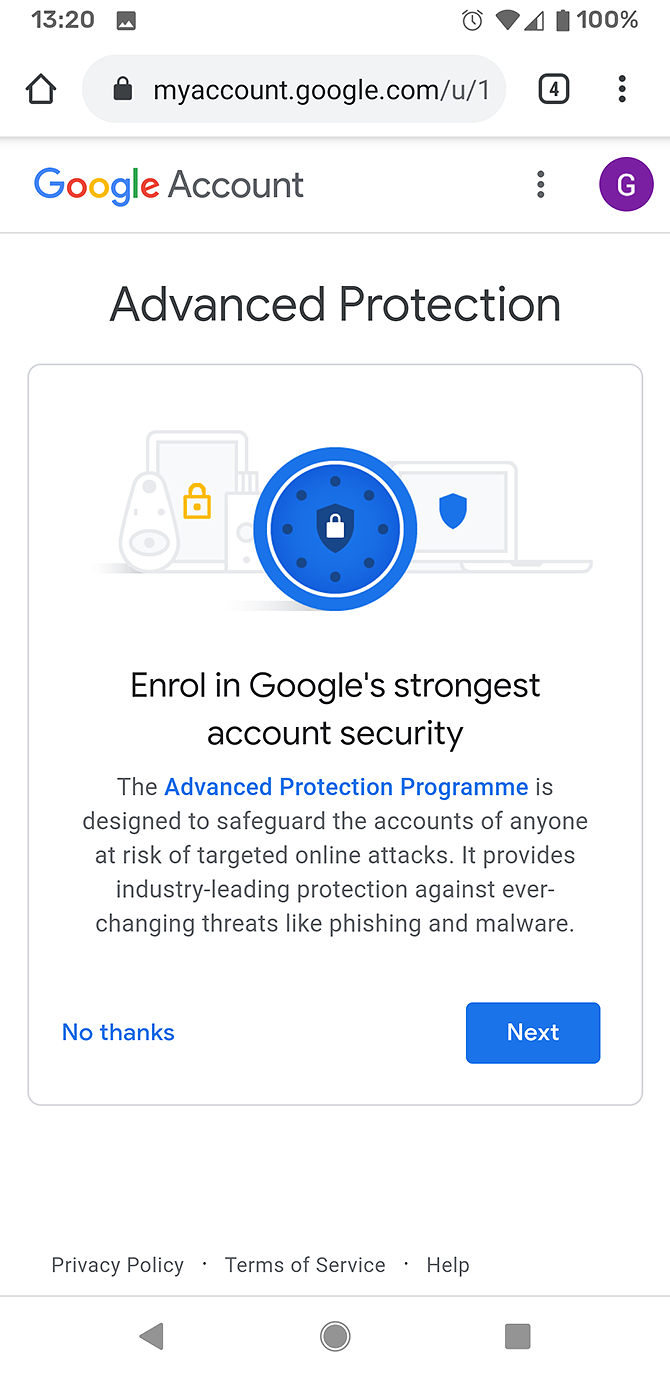
The instructions are slightly different for iPhone and Android users when enrolling in APP.

Enrolling in APP Using an Android Device

  1. Open the web browser on your Android phone and go to g.co/advancedprotection. This takes you to the APP landing page.
  2. Scroll down to the bottom of the page and find the Get started button. You’ll be taken to a splash page showing you information about the program.
  3. Click on Next to continue.
  4. Now you’ll need to enter the password for your Google account.
  5. You’ll see another splash page including a list of all your different Android devices. If you have an old phone still linked to your Google account, you’ll see it here. Make sure you select your current phone to use as a security key.
  6. Now click Enrol to register your Android device as a security key.
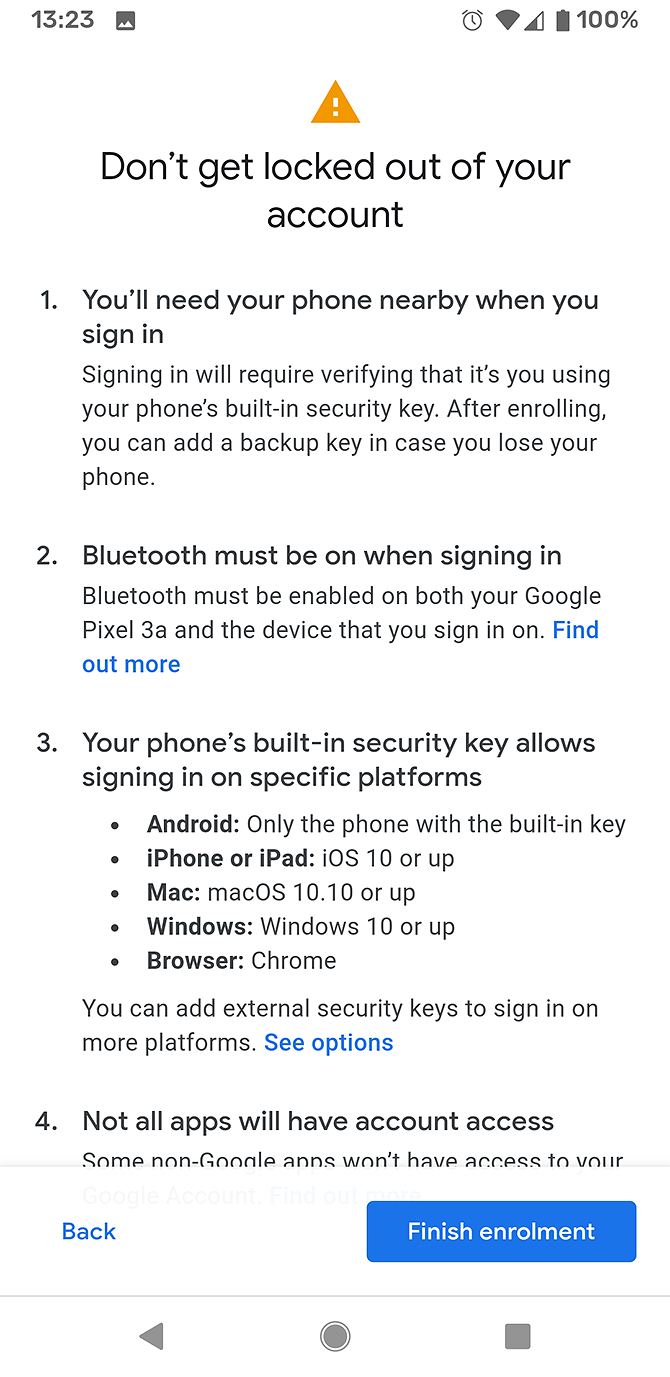
  7. You’ll see a warning screen about logging in. It will warn you that you could get locked out of your account if you don’t have your phone nearby. It also reminds you you’ll need to have Bluetooth enabled on both your phone and the device you’re signing into to log in successfully.
  8. Click Finish enrolment to complete the process.
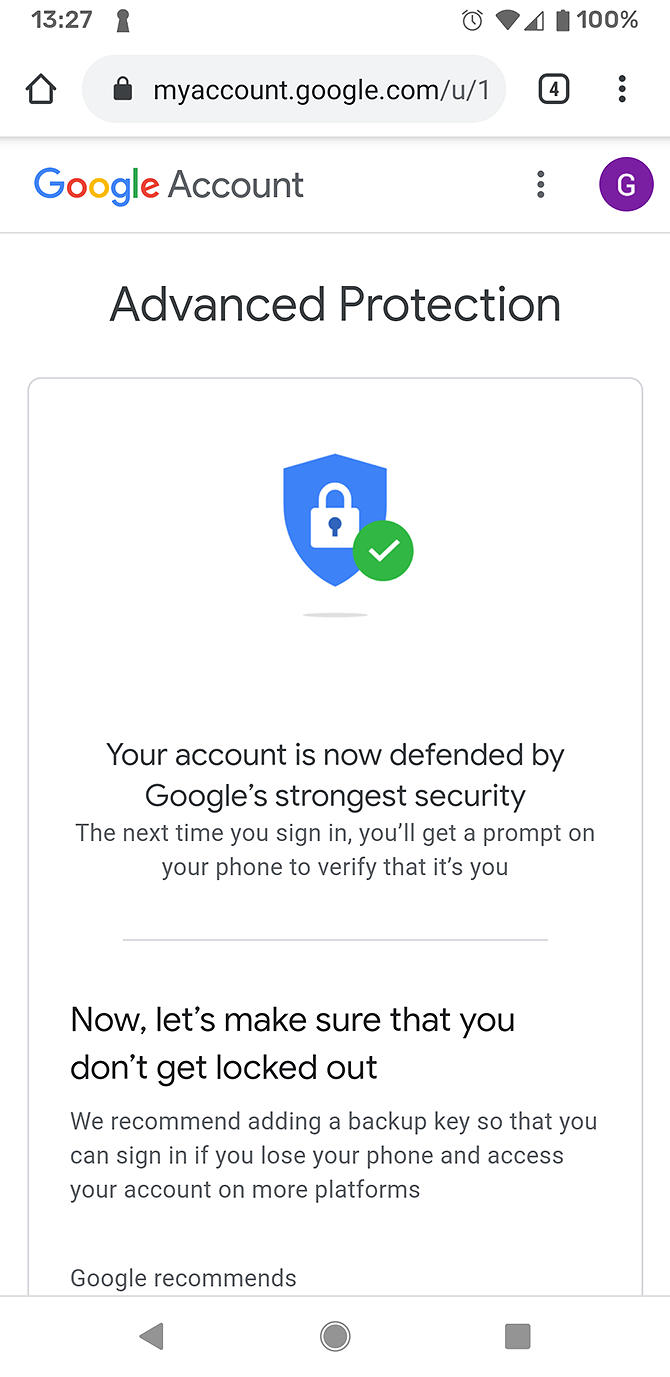
  9. The enrolment process should take just a few seconds. Then you’ll see a notification from Google Play services saying Your security key is ready. It will also show you a confirmation screen saying Your account is now defended by Google’s strongest security.
  10. Google recommends you purchase a physical security key as well to prevent the security measure from accidentally locking you out of your account. You can buy a key from this page or hit Add key later to skip this step.
  11. Now the enrolment is complete and you’re taken to a Security Check-up page.

Enroll in APP Using an iPhone

To use your iPhone as a security key, you first need to install an app called Google Smart Lock. This app is available for free from the App Store. It allows your phone to act as a security key via Bluetooth.

Once this app is installed and set up, you follow the same instructions as for the Android device above. Head to g.co/advancedprotection in your phone browser and follow the instructions from there.

How to sign it to Google using APP

Sign-in with APP works only with the Google Chrome browser. When you use Chrome to navigate to a Google site like gmail.com, it will direct you to log in with your username and password as normal.

Once you have entered your password, you will see an extra step. It will say 2-step Verification and your browser will connect to your phone via Bluetooth to confirm that it’s you.

Note that, for this to work, the device on which you’re browsing and your phone both need to have Bluetooth enabled. This means the devices can contact each other and can confirm your identity.

Once the devices connect, they confirm your login. Now you can access your Google mail, calendar, and other apps as usual.

How to Remove Your Device as a Security Key

You may need to remove your account from the APP. For example, your phone might get damaged and you have to send it off for repair. Or if you are going away and will be without your phone for some time. In these cases, you should remember to cancel APP before you are away from your device. This will prevent APP from locking you out of your account.

To remove APP from your account, go to https://myaccount.google.com/signinoptions/two-step-verification. Look in the Your second step section. You should see APP with your device as the key listed here. To remove it, click on the dustbin icon.

Remember to set another method of two-factor authentication instead, such as an authenticator app or SMS.

Protect Your Google Account Using Your Phone as a Security Key

The APP is a great option for users who need a higher level of security, especially those who are concerned about phishing.

To learn more about changes you can make to your online behavior to improve your security, don’t forget to check out our list of essential Google account settings to change for better security.

Read the full article: Protect Your Google Account Using the Advanced Protection Program
MakeUseOf

Tagged AccountAdvancedGoogleProgramProtectProtectionUsing

Post navigation

50 Kodi Keyboard Shortcuts You Need to Know
How to Delete Old Time Machine Backups on Your Mac

Related Posts

Facebook Launches a Youth Portal for Teens

May 26, 2018Malika Karoum Dubai

The FBI Warns Windows 7 Users to Secure Their PCs

August 6, 2020August 6, 2020Malika Karoum Dubai

7 Fixes When Your Android Phone Won’t Connect to Your Computer

August 17, 2020August 17, 2020Malika Karoum Dubai

RSS Malika Karoum Global News

  • Some Vancouver businesses struggling during FIFA World Cup
    Bao Bei restaurant on Keefer Street told Global News that it has seen a 30-per cent drop in business from the same time last year.
    Amy Judd
  • Rutland’s ‘Blue Shirts’ return to support businesses, community
    Business owners say they're tired of dealing with theft, disorder and makeshift camps a community patrol program known as the "Blue Shirts" is making a comeback
    Cohan Sassaman
  • Alberta dual-practice doctors could begin offering private surgeries in fall
    Surgical Services Minister Adriana LaGrange says the status quo isn't working as too many Albertans are sitting in the queue too long to get surgery.
    Globalnews Digital
  • Kelowna councilllor Ron Cannan launches mayoral campaign, promises focus on public safety
    Concerns about social disorder and public safety across the city have been growing in recent months, which Cannan says motivated his reasons to run.
    Klaudia Van Emmerik
  • Black Montreal police employees told management some are worried about going to work
    The Black employees noted in the letter that they had learned about efforts to identify whistleblowers in some units.
    Globalnews Digital
  • Weeknight concerts during Calgary Stampede must end at midnight, city memo says
    Penny Lane Entertainment, which runs the Cowboys Music Festival, has taken issue with the changes that it claims were 'designed without consultation.' 
    Adam MacVicar
  • Saskatchewan students commemorate 150th anniversary of Treaty 6 with trek
    A classroom from Chief Ahtahkakoop School commemorates the 150th anniversary of Treaty 6 with 140 km walk, from Ahtahkakoop Cree Nation to Fort Carlton.
    Ashley Beherns
  • Regina alternative school celebrates 1st class of graduates
    A school for kids going through hard times is seeing its first graduating class. Cornwall Alternative School helps youth that face barriers in the traditional education system.
    Hannah Sangster
  • Dance no more: Sherwood Park man’s curbside performance put to an end by RCMP
    If you've driven in Sherwood Park, the street corner at Baseline Road and Sherwood Drive probably looks a little empty.
    Jasmine King
  • New MPI Hail Response Centre aims to respond to record-breaking claims
    Manitoba Public Insurance opened a dedicated Hail Response Centre that hopes to assess 300 vehicles a day to aid the largest claims events in its history with this month's storms.
    Toni De Guzman

MALIKA KAROUM METAVERSE 2025

  • I Watched A 100x AI Developer Code… This Is Pure Insanity 🤯
    June 14, 2026 by Dr. Mfon Akpan
    I just reacted to David Ondrej’s interview with Pietro (former Anthropic engineer and founder of Magic Path), and honestly... software development will NEVER be the same.Watch as Pietro demonstrates how he uses OpenAI's Codex to automate 99% of his workflow, completely ditching traditional tools like Claude Code and Cursor. From coding entire interactive apps from […]
  • The Death of the Chatbot: Why OpenAI Just Merged ChatGPT & Codex
    June 7, 2026 by Dr. Mfon Akpan
    Everything we thought we knew about AI productivity just changed. OpenAI has officially merged its consumer ChatGPT team and its agentic-coding Codex team into a single unified platform.This isn't just a UI update—it’s the start of the "Execution Era." We are moving from AI that gives you advice to AI that does the work for […]
  • Google’s Massive AI Shift: Meet "Spark," the Agent That Works While You Sleep!
    May 31, 2026 by Dr. Mfon Akpan
    Google just changed the game at I/O 2026. Forget standard chatbots—Gemini Spark is here, and it’s a fully proactive AI agent designed to handle long-horizon tasks in the background, even when your computer is off.In this video, we break down:What is Gemini Spark and how does it differ from traditional AI?The "Antigravity" harness: How Google […]
  • Google I/O 2026: Everything You Need to Know in 10 Minutes! 🤯
    May 24, 2026 by Dr. Mfon Akpan
    Everything announced at Google I/O 2026! Get the quick summary on Android 16, the latest Gemini AI models, new smart features, and upcoming Google ecosystem updates. Don't forget to LIKE and SUBSCRIBE to stay up to date with the latest in tech!#GoogleIO2026 #Tech #Android16 #Gemini
  • Inside Thinking Machines: Next-Gen Interaction Models
    May 17, 2026 by Dr. Mfon Akpan
    How will we actually work alongside the next generation of AI? In this video, we go inside "thinking machines" to explore the next-gen interaction models that are reshaping human-AI collaboration. As AI models shift from simple chat interfaces to complex, reasoning-based systems, our approach to collaboration must scale. We break down the structural frameworks, technical […]
  • ChatGPT is BACK with SWAGGER! (The Ultimate AI Game Changer)
    May 10, 2026 by Dr. Mfon Akpan
    The wait is over—ChatGPT is back and it’s bolder than ever! In this video, we dive into the latest updates, the new "swagger" in its responses, and why this is a total game changer for creators and tech enthusiasts alike.We’re breaking down:The New Persona: How the AI's tone has shifted to be more confident and […]
  • ChatGPT Codex 5.5: The Greatest AI Coding Tool Ever? 🚀
    May 3, 2026 by Dr. Mfon Akpan
    Is this the end of manual coding?In today’s video, we are diving deep into ChatGPT Codex 5.5, the latest evolution in AI-driven development. Whether you are a seasoned software engineer or just starting your coding journey, this tool is a total game-changer for productivity, debugging, and rapid prototyping.In this video, you will learn:✅ Key Features: […]
  • GPT-5.5 IS HERE! The New OpenAI Model Everyone’s Talking About!
    April 26, 2026 by Dr. Mfon Akpan
    The wait is finally over! OpenAI has just shocked the world with the release of GPT-5.5, a next-generation frontier model that is redefine the boundaries of artificial intelligence. In this video, we break down every single major announcement from the launch, explaining exactly why this new model is the most discussed topic in technology right […]
  • DARKCODE: The Ultimate Hacking & Programming Guide (2026)
    April 19, 2026 by Dr. Mfon Akpan
    Welcome to the frontier of digital mastery. Whether you're a seasoned developer or just starting your journey into the shadows of the web, DARKCODE is your definitive roadmap to understanding the architecture of the modern world.In this comprehensive guide, we strip away the jargon to give you a clear, high-energy look at the intersection of […]
  • Meeting with Gael Gadah 📱
    April 12, 2026 by Dr. Mfon Akpan
    Most businesses do not fail overnight. They bleed slowly from bad decisions, weak systems, and no clear strategy.In this episode, I sit down with Gael Gadah to break down what it really takes to turn a struggling business around. This is not theory. This is execution.We talk about: • How to identify what is actually […]
News Portal | Theme: News Portal by Mystery Themes.