Skip to content
Wednesday, April 29, 2026
MALIKA KAROUM NEW FUTURE

MALIKA KAROUM NEW FUTURE

– THE NEW WEB 3.0 FUTURE –

  • Home
  • Definitions of Metaverse
  • Malika Karoum: Artificial Intelligence
  • Malika Karoum: ChatGPT
  • Malika Karoum Metaverse
    • Metaverse Digital Virtual Environment
    • A FUTURE METAVERSE
    • METAVERSE -THE NEW FUTURE-
    • Art – The Next Generation
    • The New Web 3.0
    • Metaverse project
    • What are Non Fungible Tokens (NFT-tokens)?
    • What are NFTs?
  • Malika Karoum Media

How to Create a New Apple ID Account on Any Device

Malika Karoum Online News
December 25, 2020December 25, 2020Malika Karoum DubaiLeave a Comment on How to Create a New Apple ID Account on Any Device

Even though an Apple ID isn’t required for iPhone, iPad, or Mac users, you won’t have access to all your device’s features without one. That includes Apple Music, iMessage, App Store, Find My, and more.

In this article, we’ll cover how to set up and create Apple ID using different Apple devices. So whether you’re using an iPhone, a Mac, or a Windows PC, you can get an Apple ID and start taking full advantage of Apple’s services.

Why Do You Need an Apple ID?

An Apple ID is the key to the whole range of features in the Apple ecosystem. It brings a myriad of benefits, allowing you to install applications from the App Store, download music to your device, make video calls via FaceTime, buy AppleCare, and so on.

Without an Apple ID, you won’t even be able to take advantage of iCloud—a cloud storage service for saving photos, documents, music, and other files.

The list of services that become available with an Apple ID is long. And there’s nothing stopping you from creating one—it is free and won’t take much of your time. It is also safe since all of the personal details that you provide will be protected by two-factor authentication.

Related: The Apple ID FAQ: 10 Most Common Issues and Questions Answered

Do You Need a Different Apple ID for Every Device?

No, you don’t. It’s much better to use the same Apple ID for all of your devices. For example, a single Apple ID lets you sync your contacts to iCloud and access them from any of your Apple devices.

Related: How to Safely Delete or Deactivate Your Apple ID

Creating multiple Apple ID accounts also runs the risk of splitting your purchases across all your accounts, which means you can’t access them all on the same device at the same time.

1. How to Create an Apple ID on Your iPhone

Here’s what you need to do to set up an Apple ID on your iPhone:

  1. Open the Settings app on your iPhone.
  2. At the top of the screen, tap on Sign in to your iPhone.
  3. Choose Don’t have an Apple ID or forgot it? and tap on Create Apple ID.
  4. Enter your first name, last name, and your date of birth. After you enter the required information, tap Next in the top-right corner of the screen.
  5. Now you need to enter your email address. Ensure that your email account is active because you’ll get an email to verify your Apple ID. Also, this email address will be used as your new Apple ID. If you don’t have an email address, you can create an account with iCloud. To do this, tap on Do not have an email address? and select Get an iCloud email address.
  6. The next step will be to create a password for your Apple ID. Think of a strong one and type it in.
  7. Then you’ll need to confirm your phone number and tap on Continue.
  8. Read and accept the Terms and Conditions by selecting Agree.
  9. And the last step will be to verify your email address. To do this, simply open the email account that you used in the registration process, find the Verify your Apple ID email, and tap on Verify now.
Image Gallery (4 Images)

Apple ID on Settings app

Expand
creating an Apple ID on iPhone

Expand
creating a new Apple ID on iPhone

Expand
creating an Apple ID on iPhone

Expand

Apple ID on Settings app

Image 1 of 4
creating an Apple ID on iPhone

Image 2 of 4
creating a new Apple ID on iPhone

Image 3 of 4
creating an Apple ID on iPhone

Image 4 of 4

If you’re new to the Apple ecosystem and just bought yourself an iPhone, you can create an Apple ID when turning on your phone for the first time. It’ll ask you to choose whether you want to log into an already existing account, set up a new one, or skip this step and enter these details later.

To create an account now, tap on Create a Free Apple ID and follow the instructions. Your iPhone will ask you to enter your personal details, such as your full name, birthday, and email address.

Related: Forgot Your Apple ID or iCloud Password? 6 Ways to Reset It

After you’ve created your Apple ID, you can add more information to make your account complete.

For example, if you plan to make in-app purchases, you should enter your payment details. To do this, head to the Settings app and open your Apple ID account at the top of the page. Tap on Payment & Shipping to add a payment method. Here you can also set up Family Sharing, Find My, iCloud, and more.

Image Gallery (2 Images)

Apple ID in the Settings app

Expand
continue setting up Apple ID on iPhone

Expand

Apple ID in the Settings app

Image 1 of 2
continue setting up Apple ID on iPhone

Image 2 of 2

2. How to Create an Apple ID on Your Mac

Here’s how to create a new Apple ID from your Mac:

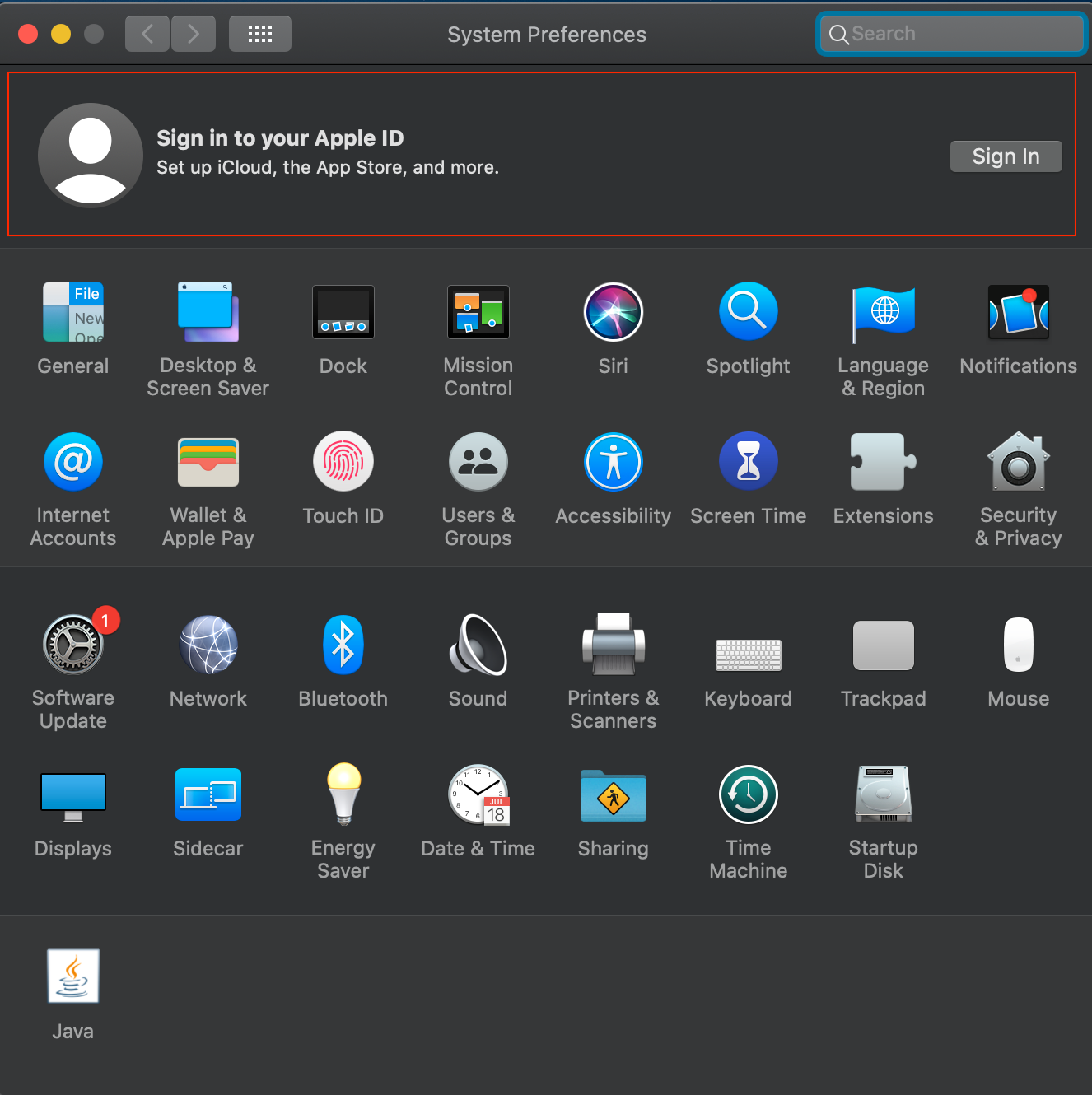
  1. Launch System Preferences from the Apple menu in the top-left corner.
  2. At the top-right of the screen, you’ll see a Sign In option; click on it.
  3. Choose Create Apple ID to begin the registration process.
  4. You’ll be asked to enter your date of birth, first and last name, email address, and to create a password for your Apple ID account. When you’re done filling out this info, tap Next.
  5. Then you need to type in your phone number and choose whether you want to verify your identity with a text message or a phone call.
  6. After you finish the verification, you’ll need to read through the Terms and Conditions, put a checkmark under the text, and click on Agree.
  7. Next, click on Verify Email Address. Open the Mail app on your Mac or any preferred browser to log into the email account that you provided when creating your Apple ID. Find the most recent email from Apple and type the code given in that message in the newly opened window.
3. How to Create an Apple ID on the Web

For this method, you can use any device with a web browser: an iMac, Windows PC, iPad, Linux laptop, and so on. Here’s what you should do:

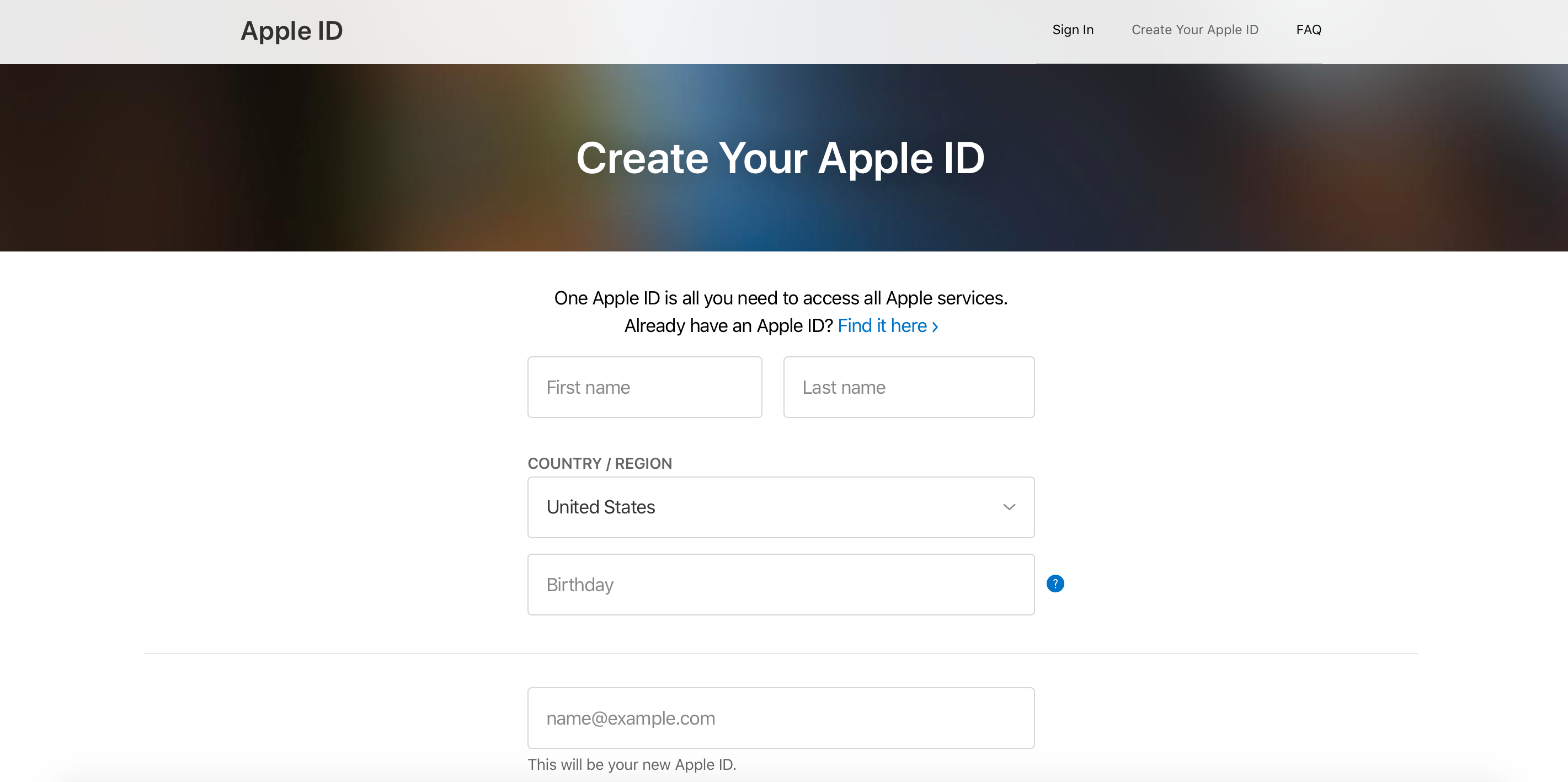
  1. Go to appleid.apple.com/account to open the Apple ID account page.
  2. Enter all of the requested personal details—first and last name, country of residence, date of birth, email address. Also, create a password for your Apple ID account and type in your phone number to verify your identity.
  3. Check everything to make sure that you provided accurate information. When you’re ready, click on Continue.
  4. The final step is to verify the email account and phone number that you used during the registration. Check your inbox to find a verification email from Apple.
How to Get the Most Out of the Apple Ecosystem

Imagine that one day luck wasn’t on your side, and you lost your iPhone. If you have an Apple ID set up on that device, you can track it with the Find My app or disable it with Activation Lock so that whoever stole it can’t use it.

The features and services that become available to you after you create an Apple ID go way beyond this as well. Don’t put off creating an Apple ID for later because you’re seriously missing out on security, social, and entertainment features that take your Apple device to the next level.


MakeUseOf – Feed

Tagged AccountAppleCreateDevice

Post navigation

Microsoft Teams Vs. Zoom: Which Is Right for You?
Apple Tells iOS Developers It’s Slashing Their App Store Fees

Related Posts

The Best Nintendo Switch Games You Can Buy Today

August 28, 2018August 28, 2018Malika Karoum Dubai

Windows 7 Gets a New Service Pack, Change Your LinkedIn Password Now… [Tech News Digest]

May 18, 2016Malika Karoum Dubai

How to Log Into Facebook If You Lost Access to Code Generator

November 16, 2018November 16, 2018Malika Karoum Dubai

RSS Malika Karoum Global News

  • ‘No more Mr. Nice Guy’: Trump threatens Iran as war enters 3rd month
    Talks between Iran and the United States seemed to have stalled Wednesday, despite Trump's earlier claims Iran had informed his administration that it was in a 'State of Collapse.'
    Globalnews Digital
  • Tumbler Ridge B.C. lawsuits filed in California court against OpenAI
    In February, OpenAI confirmed that an account connected with Van Rootelsar was identified the previous June and was subsequently banned for violating the usage policy.
    Catherine Urquhart
  • ANALYSIS: No response from Winnipeg Jets — yet — to Hellebuyck post-season ‘autopsy’
    This entire situation brings us to a couple of thoughts surrounding both Hellebuyck and goaltending overall with the Jets — now and into the future.
    Globalnews Digital
  • Camp Mystic director tearfully apologizes to victims’ families at legislative hearing
    The apology came at the outset of the hearing before he and several members of the Eastland family were questioned for about four hours by state lawmakers.
    Globalnews Digital
  • Lockdown for Manitoba First Nation as RCMP search for suspect in bar shooting
    Residents of a Manitoba First Nation were urged to lock their doors Tuesday as Mounties used dogs and other specialized units to search for a man suspected in a bar shooting.
    Globalnews Digital
  • A year later, RCMP saying little about missing Nova Scotia kids
    Almost a year after RCMP began investigating the disappearance of two Nova Scotia children, the Mounties still say there is no evidence of an abduction or criminal offence.
    Globalnews Digital
  • The Curator: 10 must-have Mother’s Day gifts for every type of Mom
    Start your engines--Mother’s Day is around the corner. From wardrobe updates to self-care staples, these gifts from Aritzia, Simons, Shark and more will make her feel celebrated.
    Adriana Monachino
  • Davis Schneider’s brother died of an overdose. The Blue Jay says naloxone can save others
    To Davis Schneider, his older brother Steven was "kind of like a Superman."
    Globalnews Digital
  • The Curator: Knix’s Anniversary Sale is here–shop these top deals now!
    The Knix Anniversary Sale is here! From leakproof underwear and swim to comfy activewear and everyday essentials, this is your moment to stock up and save big while you’re at it.
    Adriana Monachino
  • The Curator: How to turn your living room into the ultimate FIFA World Cup watch
    Can't take in a World Cup match in person? Hosting a watch party can be just as fun. Read on for your ultimate hosting guide, with top finds from Samsung, Arctic King and more.
    Robyn Fiorda

MALIKA KAROUM METAVERSE 2025

  • GPT-5.5 IS HERE! The New OpenAI Model Everyone’s Talking About!
    April 26, 2026 by Dr. Mfon Akpan
    The wait is finally over! OpenAI has just shocked the world with the release of GPT-5.5, a next-generation frontier model that is redefine the boundaries of artificial intelligence. In this video, we break down every single major announcement from the launch, explaining exactly why this new model is the most discussed topic in technology right […]
  • DARKCODE: The Ultimate Hacking & Programming Guide (2026)
    April 19, 2026 by Dr. Mfon Akpan
    Welcome to the frontier of digital mastery. Whether you're a seasoned developer or just starting your journey into the shadows of the web, DARKCODE is your definitive roadmap to understanding the architecture of the modern world.In this comprehensive guide, we strip away the jargon to give you a clear, high-energy look at the intersection of […]
  • Meeting with Gael Gadah 📱
    April 12, 2026 by Dr. Mfon Akpan
    Most businesses do not fail overnight. They bleed slowly from bad decisions, weak systems, and no clear strategy.In this episode, I sit down with Gael Gadah to break down what it really takes to turn a struggling business around. This is not theory. This is execution.We talk about: • How to identify what is actually […]
  • CLAUDE CODE LEAKED! 🚨 The Truth Exposed (Anthropic’s Secret)
    April 5, 2026 by Dr. Mfon Akpan
    Is the future of AI coding in trouble? 🚨 Anthropic’s new Claude Code has been leaked, and the details coming out are shocking. In this video, we dive deep into exactly what was found in the leak, how it impacts developers, and what this means for the competition between Claude, ChatGPT, and GitHub Copilot.We’re breaking […]
  • Replit Agent 4 is INSANE! (Build Entire Apps in Seconds 🚀)
    March 29, 2026 by Dr. Mfon Akpan
    We’re looking at the new reasoning engine, the improved UI/UX capabilities, and why this might be the end of "manual" coding as we know it. 🔥 What we cover: Setting up Replit Agent 4 Prompting for complex app logic Real-time debugging and deployment Comparison: Agent 3 vs Agent 4 If you're looking to build your […]
  • NVIDIA JUST CHANGED EVERYTHING! 🤯 (NemoClaw Explained)
    March 22, 2026 by Dr. Mfon Akpan
    Stop everything. NVIDIA just dropped NemoClaw and it is the MISSING PIECE for the AI revolution. If you thought autonomous agents were risky, think again—the game has officially changed! 🚀 In this video, we’re diving deep into why NVIDIA NemoClaw is the biggest announcement for AI developers and enthusiasts this year. We’re talking full-scale autonomous […]
  • NVIDIA PersonaPlex Explained
    March 15, 2026 by Dr. Mfon Akpan
    What if AI could operate using multiple expert personalities at the same time?In this video, I break down NVIDIA PersonaPlex, a new framework designed to orchestrate multiple AI personas to solve complex tasks. Instead of relying on a single model response, PersonaPlex allows specialized AI agents to collaborate, debate, and refine answers. Think of it […]
  • ChatGPT 5.4 is officially here, and it’s a massive leap forward for AI agents and professional workflows. 🚀
    March 8, 2026 by Dr. Mfon Akpan
    Since ChatGPT 5.4 just launched (March 5, 2026), your content should focus on its "Thinking" mode and native "Computer Use" capabilities.ChatGPT 5.4 is officially here, and it’s a massive leap forward for AI agents and professional workflows. 🚀OpenAI just dropped the most significant update to the GPT-5 family. In this video, we go hands-on with […]
  • The Professional Choice: How Basis AI is Building the Autonomous Accounting Firm
    March 1, 2026 by Dr. Mfon Akpan
    🚀 What is Basis? Basis isn't just a chatbot; it’s a "multi-agent" architecture designed specifically for accounting firms. These agents don't just answer questions—they execute end-to-end tasks like month-end closes, tax preparation, and audit testing.In this video, we cover:The Multi-Agent Shift: Why "Agentic AI" is different from traditional software.Workflow Automation: How Basis handles tax, audit, […]
  • I Tried Seedance 2.0 For The First Time!
    February 22, 2026 by Dr. Mfon Akpan
    In today's video, I am finally diving into Seedance 2.0 to see what all the hype is about. I wanted to give this a real shot and see if I could master the moves or if it would end in a total fail. To make things even more interesting, I’ve given the whole experience a […]
News Portal | Theme: News Portal by Mystery Themes.